


Weather Radar - Windy, rain
4.64.77K Reviews
App Specs
- Version
- 1.57
- Updated On
- License
- Free
- Downloads
- 5,000,000+
- Developer
- Accurate Weather Forecast & Weather Radar Map
- Categories
- Weather
- Platform
- Android
Screenshots
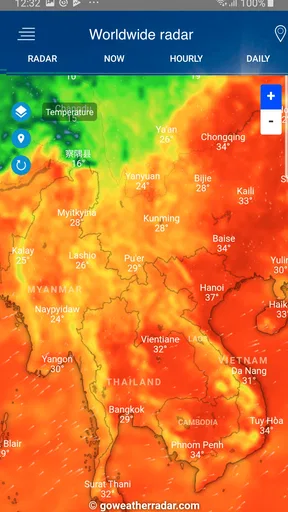
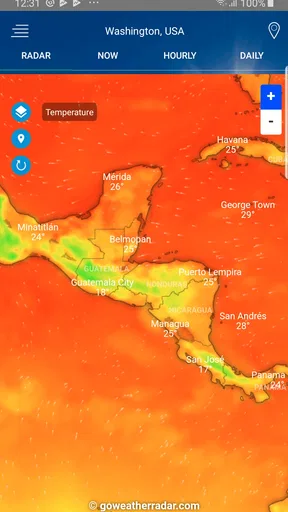
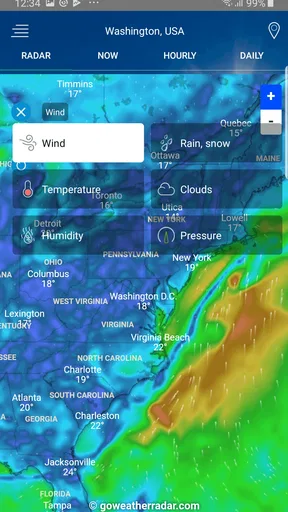
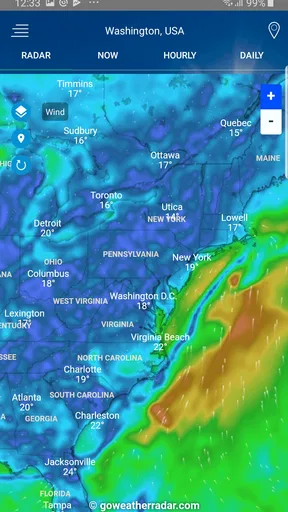
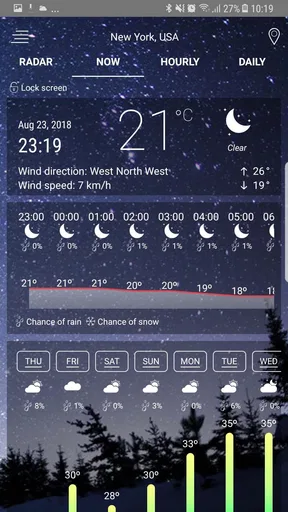
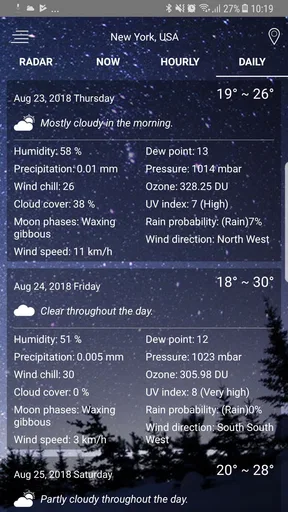
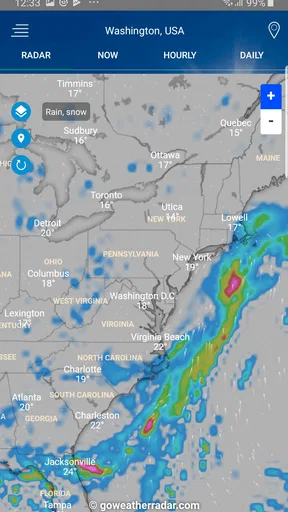
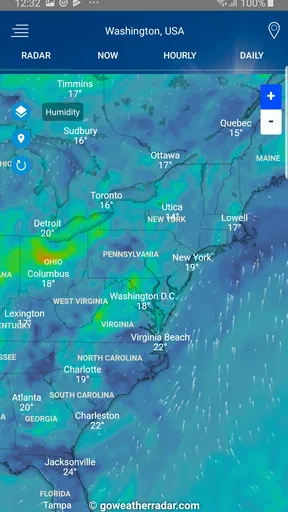
 Analysis by AppCompare
I trust a weather app most when it helps me make a practical decision without asking me to treat a colorful map as a guarantee. Weather Radar - Windy, rain ra is built around radar and weather-map viewing, so its appeal is easy to understand: I can look beyond a single icon and get a visual sense of conditions near me. That is useful, but I still treat any forecast as guidance rather than certainty, especially when plans depend on a narrow window of clear weather.
What a radar view can—and cannot—tell you
A radar map is most useful when I need to judge whether precipitation appears to be approaching, passing nearby, or moving away. It can add context that a simple “rain” symbol cannot, and that difference matters when I am deciding whether to leave now or wait a little. The sensible habit is to check the map alongside the forecast, not to assume that a colored patch guarantees exactly when rain will reach my street.
For a commute, I would use the map to decide whether an umbrella is worth carrying, then check again before setting off if the weather looks unsettled. For a longer outdoor plan, I would use it as one input rather than the whole plan: a radar snapshot is less useful for deciding what conditions will be like hours from now than a forecast covering the day. Radar is best for near-term context, while a forecast helps with broader planning.
Trust, choices, and sensible expectations
The app is free and has a Everyone content rating, which makes it easy to try as a basic weather tool. It is developed by Accurate Weather Forecast & Weather Radar Map, and its listing shows an average rating of 4.6 from around 113 thousand ratings, with about 4.8 thousand written reviews. Those figures suggest that many people have tried it, but they cannot tell me whether a particular forecast will match the conditions outside my window.
I also avoid assuming that a weather app handles location, notifications, or personal information in a particular way unless I can check its actual settings and disclosures. When I install it, I look at the permission prompts and allow only what makes sense for how I plan to use it. If I want weather for one fixed place, manually choosing that location is a reasonable alternative to granting location access, when the app offers that choice.
Making alerts useful rather than noisy
Alerts are valuable only if they help me act. If notifications are available, I would start with the ones relevant to my routine instead of enabling every possible prompt. A person who walks to work may care about rain timing; someone with a weather-sensitive outdoor activity may want to pay closer attention to changing conditions. Too many alerts can become background noise, which makes it easier to miss the one that matters.
I would also check whether the app’s notification and location controls match my preferences after setup. Phone-level settings can help limit interruptions, while app-level choices—where available—can make alerts more targeted. If I do not need changing conditions pushed to me, opening the map when I choose is a perfectly reasonable way to use a weather app.
Worth Reading Before You Choose

Flipboard Shows What News Apps Must Do Beyond the Feed

Switching to Android Auto Means Rethinking Your Driving Routine

Google Calendar Makes a Crowded Week Easier to Manage

Ludo King Makes the Most of the Minutes Between Plans

Baby Panda World Brings Quick Play to Modern Phones, but Its Game Library Feels Busy

ESPN’s Live Game View Makes Following Close Games Easier
First Impressions: A User-Friendly Forecast
Downloading Weather Radar - Windy, rain ra was a breeze, and the installation process was smooth as silk. As soon as you open the app, you're greeted with an intuitive interface that’s both visually appealing and easy to navigate. The main screen offers a comprehensive overview of the weather, with options to drill down into more detailed forecasts should you need them.
One of the first things I noticed was the vibrant color scheme and clean design. It’s clear that a lot of thought has gone into the user experience, making it both straightforward for the tech-savvy and the tech-challenged alike. I mean, who doesn’t love an app that doesn’t require a manual to figure out?
Features That Forecast Your Day
Now, let’s talk features. This app isn’t just about telling you if it’s going to rain or shine. Oh no, it’s much more than that. With Weather Radar - Windy, rain ra, you get a detailed weather map that allows you to see real-time changes in the weather patterns. Whether it’s wind speed, precipitation, or temperature fluctuations, this app’s got you covered.
One feature I found particularly cool is the wind forecast. If you’re into sailing or kite surfing, or you just want to know if it’s a bad hair day kind of wind, this app will give you all the info you need. And for those of us who like to plan our weekly outfits or outdoor activities, the seven-day forecast is an absolute lifesaver.
Planning beyond the next few hours
I find it helpful to separate two questions that often get bundled together: “What is happening nearby now?” and “What should I plan for later?” The radar view speaks more directly to the first, while a multi-day forecast is better suited to the second. I would not use a week-ahead outlook to decide whether to cross town in the next few minutes, and I would not rely on a current radar image to choose clothes for several days from now.
A practical routine is to check the broader forecast when making plans, then use the map again shortly before leaving if rain or wind could change the decision. For an outdoor gathering, that might mean choosing a flexible start time rather than treating one forecast as a promise. This approach makes the app more useful without asking it to do something no weather tool can do perfectly: remove uncertainty.
Real-Time Alerts and Notifications
Let’s face it, we’ve all been caught in an unexpected downpour or left sweating under a blazing sun because we didn’t check the weather before leaving home. With this app, those days are over. You can set up real-time alerts to notify you of sudden weather changes or severe weather warnings. It’s like having a weather watchdog that keeps you in the loop 24/7.
What’s more, you can customize these notifications to suit your needs. Whether you’re interested in storm alerts or just want a gentle nudge about the day’s high and low temperatures, this app caters to your specific preferences.
A realistic day with the app
Imagine I am getting ready for a morning commute and the sky looks uncertain. I can check the overview first, then inspect the radar rather than making a decision from cloud cover alone. If the map suggests unsettled conditions, carrying an umbrella is a low-effort precaution; if I am planning to cycle, the wind forecast may matter just as much as rain. I would check again before a longer ride, because conditions can change while I am away from home.
That kind of quick check is where a visual weather app earns its place. It helps me connect the forecast to a real choice—what to pack, when to leave, or whether to move an outdoor plan—without turning ordinary weather into a project. For safety-critical decisions, such as whether to continue a remote trip in worsening conditions, I would use official local warnings and sound judgement as well, rather than depending on one app alone.
Performance and Reliability
No one likes an app that’s slow to load or crashes every time you open it. Thankfully, Weather Radar - Windy, rain ra runs smoothly and loads quickly, even on older devices. I’ve used it in various locations and conditions, and it’s consistently delivered accurate forecasts without a hitch.
The app’s performance is solid, and it’s clear that the developers have poured a lot of effort into ensuring reliability. You can count on it to keep you informed no matter where you are in the world.
What to expect from an everyday weather app
The app is free, and its current version is 1.54, with Android support starting at version 5.0. It has been available since September 28, 2018, and has passed five million installs. That reach makes it a familiar option for many Android users, but popularity is not a substitute for checking whether its map and forecast suit the places and decisions that matter to me.
Compared with a basic weather screen built into a phone, a radar-focused app is more useful when I want to inspect precipitation visually instead of scanning a short summary. A simpler built-in option may still be better if all I need is the temperature at a glance and I prefer fewer screens to navigate. Dedicated weather services can also differ in how they present maps and forecasts, so I would compare the view and readability I actually use rather than choosing based on feature count alone.
A Handy Tool for Everyday Life
So, who exactly is this app for? Well, pretty much anyone who steps outside, really. Whether you’re planning a weekend getaway, a picnic, or just trying to figure out if you need an umbrella for your morning commute, this app is your go-to guide. It’s also a fantastic tool for outdoor enthusiasts who need to keep tabs on weather conditions for safety reasons.
I think it is especially suited to someone who likes visual context and will check conditions before making a plan. It may be less appealing if you only want a minimal forecast, dislike map-based interfaces, or expect a precise answer far in advance. People who make high-consequence outdoor decisions should treat it as one source of information and consult relevant local alerts when needed.
Small habits that make the map more useful
When I open a radar map, I try to keep the view focused on the location that affects my decision rather than scanning a large area without a purpose. I look for the broad movement and timing of precipitation, then ask what action would actually change: leaving earlier, taking a different route, or packing a waterproof layer. This prevents the map from becoming interesting but not useful.
I also avoid reading too much into a single moment. If the weather is changing quickly, checking again closer to departure is more practical than repeatedly refreshing while I still have hours before leaving. For a day out, I use the longer forecast to set expectations and the radar nearer the time to refine the plan. The trade-off is simple: more detail can help, but it does not make the weather certain.
Who may prefer another approach
If I wanted only a quick temperature check, I would probably choose the simplest weather screen already available on my device. If I were planning around serious local hazards, I would prioritize official warnings and keep a second trusted source handy. And if I found myself checking maps constantly without making better decisions, I would turn off nonessential notifications or use the app only when a real plan depends on the weather.
Those are not reasons to dismiss this app; they are ways to match the tool to the task. Its map-centered approach is a good fit for people who want to see weather patterns, while a compact forecast may suit someone who values speed above detail. The best choice is the one that helps me act calmly and gives me information in a form I can understand.
In summary, Weather Radar - Windy, rain ra is more than just a weather app. It’s a reliable companion that helps you make informed decisions about your day-to-day activities. With its user-friendly interface, detailed forecasts, and customizable alerts, it’s a must-have for anyone who wants to stay one step ahead of Mother Nature.
So, next time you’re wondering whether to pack that raincoat or sunscreen, just check your app, and you’ll have all the answers at your fingertips. Happy forecasting!
My cautious verdict
I would recommend giving it a try if you want a weather map alongside a broader forecast and are comfortable making your own call from the information shown. I would not treat any radar display or notification as a guarantee, and I would keep permissions and alerts aligned with how I actually use the app. Used that way, it can be a convenient part of a daily routine rather than the sole authority on what the sky will do.
Pros
- Intuitive and user-friendly interface.
- Accurate real-time weather updates.
- Detailed radar and wind maps.
- Customizable alerts and notifications.
- Works smoothly on both Android and iOS.
Cons
- Consumes a lot of battery power.
- Ads can be intrusive at times.
- Requires internet for real-time data.
- Premium features are behind a paywall.
- Occasional slow load times on older devices.
FAQs for Weather Radar - Windy, rain
What features does Weather Radar - Windy, Rain provide?
Weather Radar - Windy, Rain offers real-time radar images, wind and rain forecasts, and detailed weather updates. Users can access interactive maps to track storms, monitor temperature changes, and receive alerts for severe weather conditions. The app also provides a long-term weather forecast, helping users plan ahead for outdoor activities.
Is Weather Radar - Windy, Rain free to use?
Weather Radar - Windy, Rain offers a free version with basic features, allowing users to access essential weather information. However, to unlock advanced features such as ad-free usage, enhanced radar capabilities, and additional customization options, users may need to purchase a subscription or make in-app purchases.
How accurate are the weather forecasts in Weather Radar - Windy, Rain?
The app utilizes data from reputable meteorological sources and employs advanced algorithms to deliver accurate forecasts. While no app can guarantee 100% accuracy, Weather Radar - Windy, Rain is known for its reliable predictions, especially for short-term forecasts. Users can trust it for planning daily activities, but should remain cautious during rapidly changing weather conditions.
Does Weather Radar - Windy, Rain require an internet connection?
Yes, Weather Radar - Windy, Rain requires an internet connection to fetch real-time data and provide the most up-to-date weather information. While some features may be accessible offline, such as previously downloaded data, a stable connection is essential for live radar, updates, and alerts.
Can I customize notifications in Weather Radar - Windy, Rain?
Yes, users can customize notifications to receive alerts for specific weather events, such as thunderstorms, heavy rain, or high winds. The app allows users to set notification preferences based on their location and weather interests, ensuring they receive timely and relevant alerts tailored to their needs.


